
What Separates Great Video Wall Controller Software from the Rest
A video wall is only as capable as the software controlling it. The hardware, the displays, the processors, they all matter, but the software layer is what determines whether operators can work efficiently, collaborate in real time, and maintain security across distributed environments. Yet most video wall controller software on the market treats the software as an afterthought, a basic interface bolted onto proprietary hardware.
Canvas takes a fundamentally different approach. Built by Jupiter Systems as a dedicated video wall management software platform, Canvas delivers enterprise-grade source management, granular security, real-time collaboration, and mobile field connectivity in a single unified environment. It sits above Jupiter’s Catalyst video wall controllers and integrates with PixelNet distributed systems, giving operators a consistent experience regardless of scale, from a single conference room display to a multi-building command and control operation spanning dozens of walls.
This guide breaks down every capability that modern video wall controller software must deliver, and shows how Canvas addresses each one at a depth that competing platforms simply do not match.
Client-Server Architecture Built for Scale
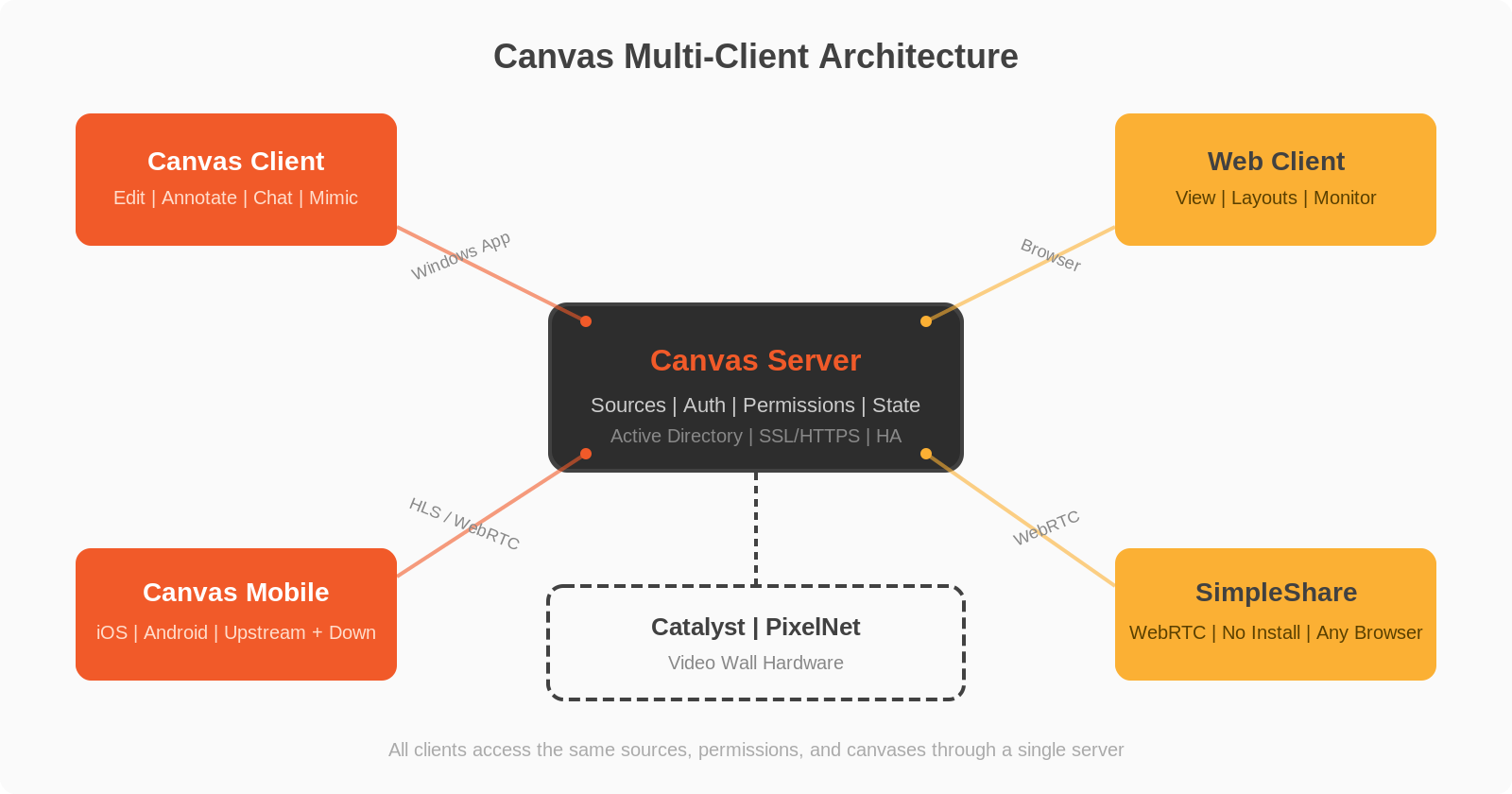
Canvas uses a true client-server architecture with multiple access points designed for different operational roles. The Canvas Server is the central hub, managing all source connections, user authentication, permissions, and system state. It runs on standard server hardware and supports both workgroup and domain-joined configurations, including full Windows Active Directory domain forest topologies.
Operators interact with Canvas through three client interfaces. The Canvas Client is a full-featured Windows application for source editing, layout configuration, annotation, and wall control. The Web Client provides browser-based access for viewing walls, launching layouts, and monitoring sources without installing anything. And Canvas Mobile extends the platform to iOS and Android devices for field personnel who need to stay connected from anywhere.
This multi-client approach is distinctive in the video wall software market. Most competing platforms offer either a desktop application or a web interface, rarely both, and almost never a dedicated mobile app with upstream video capabilities. Canvas delivers all three, each purpose-built for its use case rather than forcing a single interface to serve every scenario.
The architecture also supports virtual machine deployment for domain-joined environments, meaning Canvas Server can run within existing enterprise virtualization infrastructure rather than requiring dedicated physical servers. This is a significant advantage for IT teams who need to integrate video wall management into their existing data center operations without adding complexity.
Six Source Types for Every Operational Need
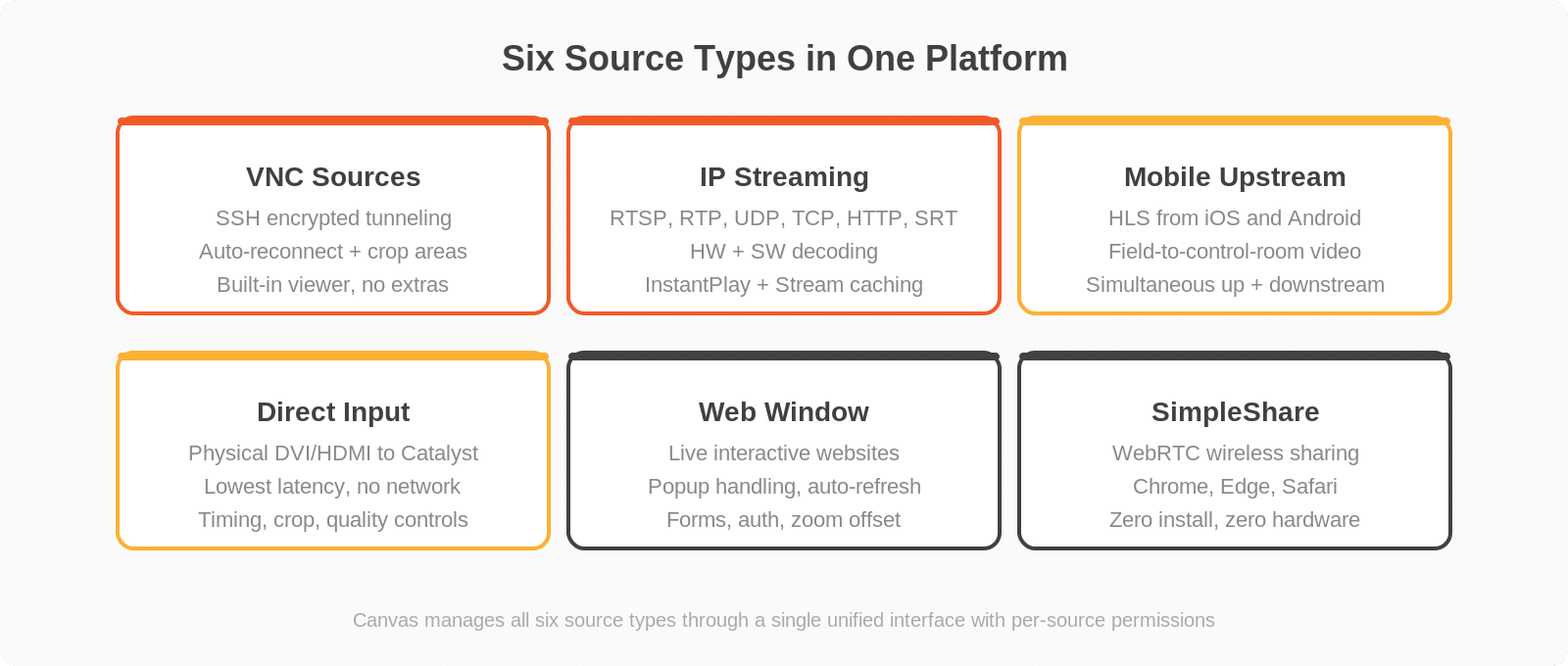
The breadth of source types a video wall management software platform can handle determines what operators can actually display. Canvas supports six distinct source categories, each with deep configuration options that give operators total control over how content reaches the wall.
VNC Sources with Encrypted Tunneling
Virtual Network Computing (VNC) allows any PC, laptop, or server to share its screen to the video wall. Canvas includes a built-in VNC viewer, eliminating the need for third-party software. What sets Canvas apart is its integrated SSH tunneling: every VNC connection can be encrypted end-to-end through Secure Shell Protocol, protecting sensitive desktop content in transit. The platform supports automatic VNC reconnection if a source temporarily drops, and crop areas let operators display only a specific region of a remote desktop rather than the full screen.
By comparison, many competing platforms either lack native VNC support entirely, require additional paid licenses for remote desktop sources, or offer no encryption for VNC connections. For operators managing sensitive information, unencrypted desktop sharing is simply not an option.
IP Video Streaming with Hardware and Software Decoding
Canvas handles an extensive range of IP video streaming protocols: RTSP, RTP, UDP (unicast and multicast), TCP, HTTP, and SRT. Supported codecs include H.264, MPEG-2 (ES and Transport Stream variants), and MPEG-4 (ES and Transport Stream). Sources can use hardware decoding on Catalyst processors or software decoding on Canvas Clients, with automatic fallback between the two.
Two features stand out for latency-sensitive operations. InstantPlay reduces buffering to display the most recent frame, critical for surveillance and real-time monitoring. Stream caching maintains a local buffer so sources resume instantly when switching between layouts. In environments like emergency operations centers, traffic management, and security monitoring, where even seconds of video delay can impact decision-making, these capabilities are not optional, they are essential.
Mobile Upstream Video
Canvas Mobile allows field personnel to share live video from their smartphone cameras directly to the video wall using HTTP Live Streaming (HLS). This is not just a view-only mobile app: it enables true two-way communication between field teams and control room operators. We cover Canvas Mobile in full detail below.
Direct Input Sources
For Catalyst video wall controllers, Direct Input sources connect physical video signals (DVI, HDMI) directly to the processor’s input cards. These sources bypass the network entirely, providing the lowest possible latency for mission-critical feeds. Canvas supports synchronized inputs that combine multiple physical connections for high-resolution display, with full timing control, image quality adjustment (brightness and contrast), and precision crop capabilities.
Web Window Sources
Web Window sources display live, interactive websites directly on the video wall. Unlike simple screenshot captures that some platforms use, Canvas renders web content as fully interactive pages: operators can click buttons, fill forms, and navigate within the web source. Configuration options include popup handling for sites requiring authentication, auto-refresh intervals for dynamic dashboards, and zoom offset controls for targeting specific page regions.
This matters for operations centers displaying real-time dashboards, weather services, mapping applications, or business intelligence platforms. The web source stays live and interactive, not frozen as a static image that operators cannot act on.
SimpleShare: Browser-Based Wireless Sharing
SimpleShare is a WebRTC-based feature that lets any user share their desktop or a specific application window to the video wall directly from Chrome, Edge, or Safari, with no software installation required. A presenter simply navigates to a URL, selects what to share (entire screen, single application, or browser tab), and their content appears on the wall instantly.
This is a capability that no competing video wall controller software platform offers natively. Other solutions require dedicated sender hardware, proprietary client software, or third-party wireless presentation devices. Canvas integrates wireless content sharing directly into the platform using open web standards, meaning any visitor, contractor, or partner with a laptop and a browser can share to the wall in seconds.
Enterprise Security That Goes Beyond Login Screens

Security in video wall software is not just about passwords. In command and control environments handling classified, law enforcement, or critical infrastructure data, the software must enforce access policies at every layer. Canvas was designed from the ground up for the most security-sensitive deployments in government, military, and critical infrastructure, and it shows in every aspect of the platform.
Active Directory Integration with Domain Forest Support
Canvas integrates directly with Windows Active Directory for Single Sign-On (SSO). This is not limited to simple domain authentication: Canvas supports full domain forest topologies, meaning organizations with multiple interconnected domains can authenticate users across their entire directory structure. Users log in with their existing corporate credentials, eliminating the need for separate video wall accounts and reducing the attack surface of credential management.
Granular Role-Based Access Control
Canvas implements four-tier permissions (Admin, Edit, View, Annotate) that can be assigned independently per source and per canvas for each user role. An administrator might grant a security team full edit access to surveillance canvases but view-only access to operations dashboards, while giving operations staff the reverse permissions. Permissions cannot be assigned to individual accounts directly; they flow through roles, enforcing organizational security policies rather than ad hoc per-person exceptions.
If permissions are not explicitly assigned, sources and canvases are invisible to users. This default-deny approach means a misconfiguration results in hidden content rather than exposed content, the safer failure mode for secure environments. Most competing platforms take the opposite approach, making everything visible by default and relying on administrators to lock things down. Canvas assumes the worst and protects accordingly.
Encrypted Communications and Security Logging
Canvas supports HTTPS via IIS with both self-signed and commercial SSL certificates. VNC connections can be encrypted through SSH tunnels. The platform generates detailed Windows Security event logs with dedicated Event IDs (2000 through 2204) tracking every login, logout, account creation, deletion, and source sharing operation. After 15 failed login attempts, accounts lock automatically.
This level of security auditing is rare in video wall management software. Most competing platforms offer basic authentication and coarse-grained role assignments, but lack event-level security logging that integrates with enterprise SIEM systems through standard Windows event infrastructure. For organizations that must demonstrate compliance with security audit requirements, Canvas provides the evidence trail that other platforms simply cannot.
Real-Time Collaboration, Not Just Display
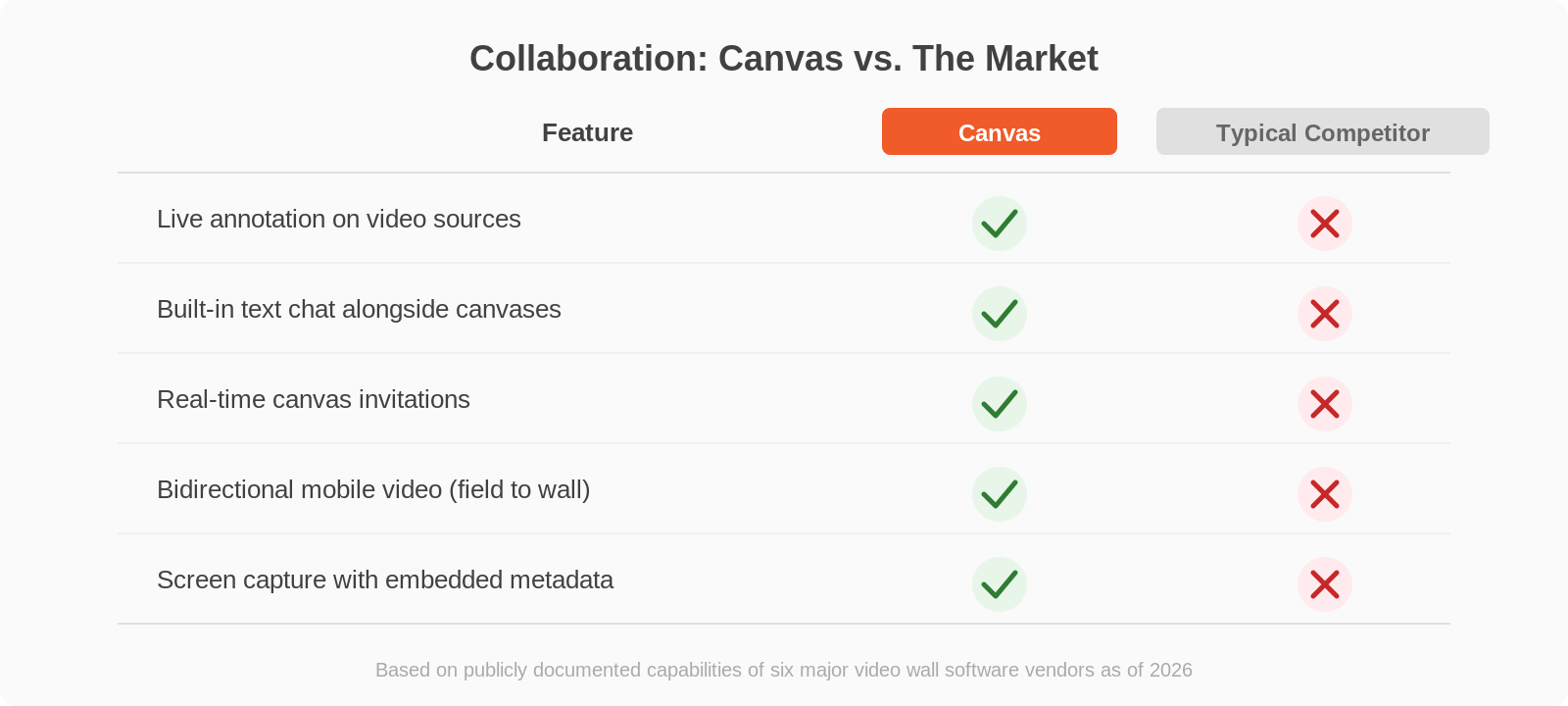
This is where Canvas creates the widest gap between itself and every other video wall controller software platform on the market. Canvas is not just a display management tool. It is a collaboration environment that transforms how teams work together around shared visual information.
Live Annotation on Video Sources
Users with annotation privileges can draw directly on live video wall content using a full toolkit: pencil, lines, shapes, text, with selectable colors and line thickness. Annotations appear in real time across all connected clients viewing the same canvas. This is invaluable in situations like emergency response, where an incident commander needs to circle an area on a map, highlight a sensor reading, or mark a route on a live camera feed, and have everyone in the operation see it instantly.
No other major video wall software platform offers live annotation on video sources. Not one. This is not an add-on, not a third-party integration. It is built into Canvas at the core, because Jupiter understands that operators do not just watch walls, they work with them.
Integrated Text Chat
Canvas includes built-in chat that operates simultaneously with editing and annotation. Operators can communicate via text messages displayed in a chat panel alongside their canvas work. Chat messages are preserved and can be captured alongside screen captures for documentation and after-action review. In high-pressure operational environments, having communications integrated directly into the video wall platform eliminates the friction of switching between tools.
Real-Time Canvas Invitations
The invitation system allows any user to invite another active user to view a specific canvas or source in real time. The recipient sees the invitation appear in their Canvas Client with a clickable link that opens the shared content immediately. This creates instant situational awareness: when a critical event occurs, an operator can push relevant content to decision-makers in seconds, not minutes. No email, no phone call, no walking to another desk.
Screen Capture with Metadata
Canvas captures the full composite view of a canvas with annotations, plus individual sources at their native resolution, plus chat messages as text files, all packaged in a single timestamped folder. Every capture embeds metadata (username, date/time, canvas name) directly in the image files. Captures can be saved in PNG (lossless) or JPEG format, compressed or uncompressed, to local or network folders. This creates an auditable, tamper-evident record of exactly what was displayed and discussed during any incident, a capability that security and compliance teams will immediately appreciate.
Canvas Mobile: The Control Room in Your Pocket
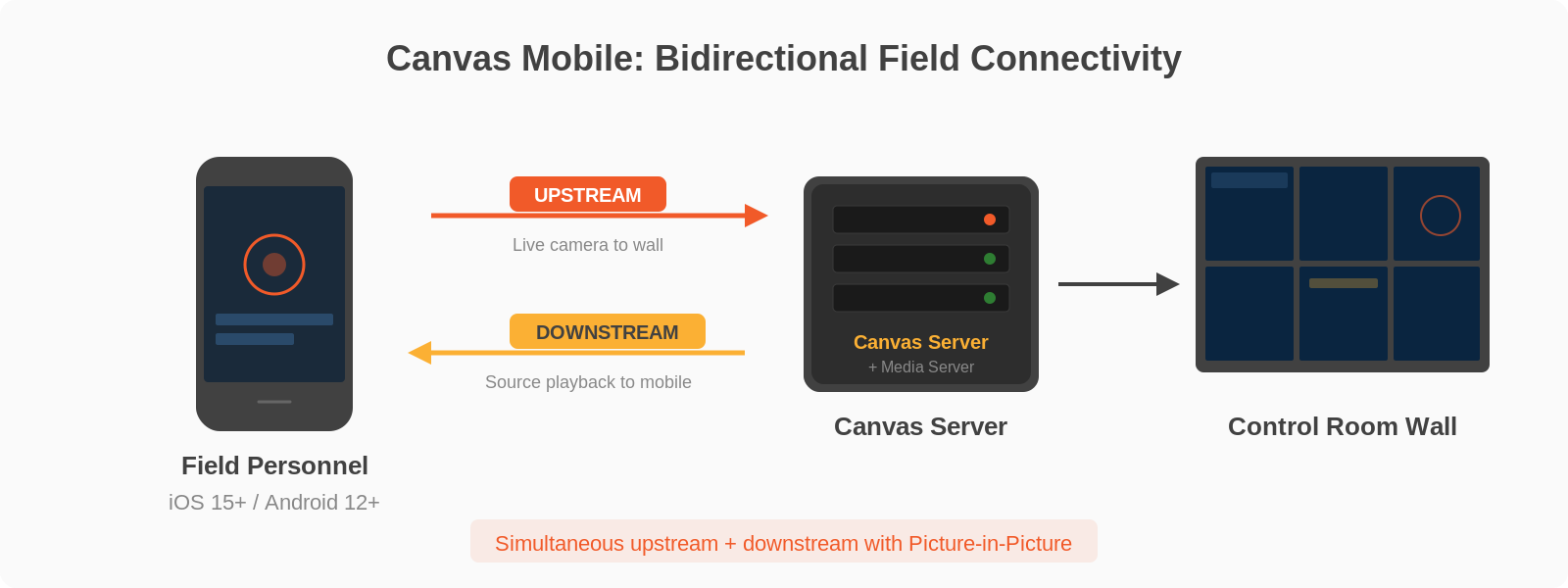
Canvas Mobile is not a scaled-down viewer. It is a full participant in the Canvas ecosystem, supporting both downstream video playback and upstream video capture simultaneously.
Downstream: View Any Source, Anywhere
Authorized mobile users can browse and search all sources they have permission to view, tap to start playback, and switch between sources with Picture-in-Picture keeping the previous stream visible. The interface is purpose-built for mobile (iOS 15+ and Android 12+), not a responsive web page forced onto a small screen.
Upstream: Share Live Video from the Field
The upstream capability is what truly differentiates Canvas Mobile from anything else on the market. A field technician, inspector, or first responder can capture live video from their smartphone camera and stream it directly into Canvas, where it appears as a source that can be displayed on any video wall. This creates a direct visual link between personnel in the field and teams in the control room.
Upstream and downstream operate simultaneously: a field operator can watch a reference source from the control room while sharing their own camera feed back. This two-way visual communication transforms how distributed teams coordinate during inspections, incident response, maintenance operations, and any scenario where remote eyes need to connect with centralized expertise.
The Jupiter Mobile Media Server handles the transcoding infrastructure, supporting WebRTC for real-time transport and RTSP for downstream ingress. It can run on a dedicated server for large-scale deployments or on the Canvas Server itself for smaller installations, with no additional licensing complexity.
Among competing video wall management software platforms, most offer no mobile access at all. The few that provide mobile functionality limit it to view-only streaming with no ability to share video back to the control room. Canvas Mobile’s bidirectional capability is unique in the industry, and for organizations with field personnel, it changes everything.
Remote Wall Control with Canvas Mimic
Canvas Mimic allows operators to fully control a remote video wall from their Canvas Client workstation. The Mimic window displays a live, scaled representation of the wall, where operators can move, resize, and reorder source windows with drag-and-drop. Full keyboard and mouse control of the remote wall is available through Remote Cursor, activated with a simple Ctrl+Alt+C toggle. Operators get the same control they would have standing in front of the wall, from anywhere on the network.
Layout Management
Operators can save the current arrangement of sources as a named layout, recall any saved layout instantly, designate a default layout that loads on system reboot, and manage layouts through a dedicated Layout Launcher, a button-based interface that can be accessed directly via URL, filtered with search, and customized with background images. Layouts store the complete state of all canvases, sources, and mimic objects, including size, position, z-order, and borders.
The Layout Launcher supports URL parameters for pre-configuring filters and behavior, making it ideal for integration with touch panels and third-party control systems. For operations that require rapid layout switching during shift changes, incident escalations, or scheduled briefings, this capability saves critical time.
Local Sources on the Mimic
Beyond shared network sources, Canvas Mimic supports six types of local sources that can be created directly on the wall: Applications (any Windows program), Images, Text (with scrolling and font customization), Clocks (with configurable date formats and time zones), DVI Inputs (with full timing, crop, and image quality controls), and Web pages (with auto-refresh and zoom offset). This means operators can enrich their wall content without requiring administrator intervention for every change.
Templates and Reuse
Canvas templates let operators export any canvas design as a reusable template that can be applied to other canvases. Templates can be marked as “Preferred” for quick access, applied from right-click menus, and managed through both the Canvas Client and the Administration UI. This templating system dramatically reduces setup time when configuring similar environments across multiple walls or operational shifts.
High Availability for 24/7 Operations
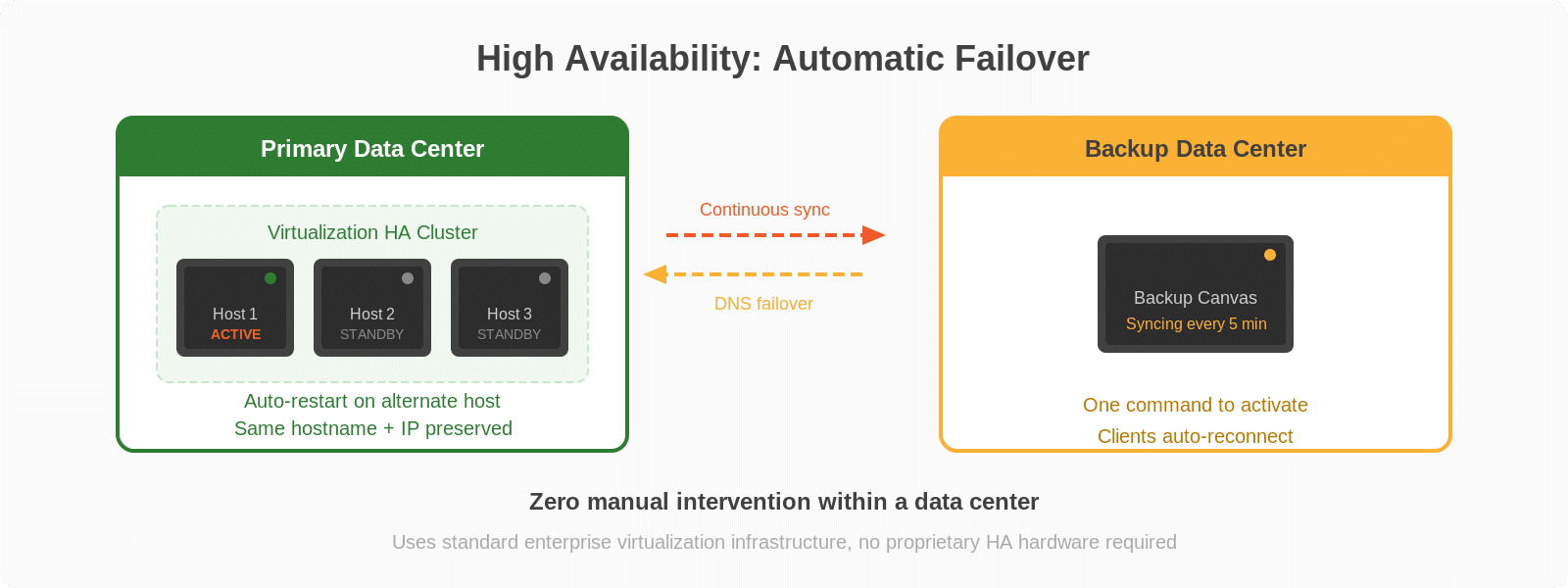
Mission-critical environments cannot tolerate software downtime. Canvas supports enterprise-grade high availability through standard virtualization HA clustering, using the same infrastructure that IT teams already trust for their most critical applications.
Within a data center, Canvas Server runs as a virtual machine in an HA cluster. If the host server fails, the cluster automatically restarts Canvas Server on another host, maintaining the same hostname and IP address. All Canvas Clients automatically reconnect when the server comes back online, with zero manual intervention required.
For cross-data-center failover, Canvas provides dedicated command-line utilities for continuous data replication. A standby server syncs data from the active server at configurable intervals (default: every five minutes). If the primary data center fails, a single command activates the backup server. After a DNS update, all Canvas Clients reconnect automatically to the new primary.
Many competing platforms either charge additional license fees for redundancy, require purchasing multiple extra hardware units dedicated solely to failover, or offer only redundant power supplies without actual application-level failover. Canvas builds HA into the platform architecture using standard enterprise infrastructure, making high availability an architectural feature rather than a premium upsell.
Administration Built for Scale
Managing a video wall deployment with dozens of sources, multiple walls, and many user accounts requires efficient administration tools. Canvas delivers these through a comprehensive web-based Administration UI that puts every configuration option at the administrator’s fingertips.
The batch source import feature deserves special attention: administrators can create a CSV file defining hundreds of sources (with all properties: type, name, host, URL, codec, protocol, credentials) and import them in a single operation. This eliminates the hours of tedious, error-prone, manual source-by-source configuration that most competing platforms require. When deploying a new facility or migrating from a legacy system, this capability alone can save days of setup time.
Additional administrative capabilities include full system backup and restore (canvases, sources, roles, settings, layouts, media servers, mobile devices), active session monitoring with the ability to disconnect any session, flexible licensing (named user and floating license pools with both online and offline activation), email SMTP configuration for user notifications, and configurable screen capture settings (format, compression, destination folder).
Canvas REST API and Automation
Canvas exposes an API that enables integration with third-party control systems, building management platforms, and custom automation workflows. The Canvas API Service accepts commands via TCP, allowing programmatic control of layouts, sources, and wall configurations from scripts, automation platforms, or any system that can send network commands.
This API layer means Canvas can respond to external triggers: an alarm system can automatically switch the video wall to a predefined emergency layout, a scheduling system can rotate content throughout the day, or a building management system can power walls on and off based on occupancy. For operators, this means the wall reacts to events in real time without anyone having to manually switch layouts under pressure.
How Canvas Compares to the Market
When evaluating video wall controller software, the competitive landscape reveals several common limitations that Canvas specifically addresses. After reviewing every major platform on the market, the pattern is clear: most video wall software was designed to put images on screens. Canvas was designed to help operators work.
Hardware lock-in. Most video wall management software platforms are tightly coupled to proprietary hardware encoders, decoders, and processors from the same vendor. Canvas runs as a software layer above Jupiter’s processor hardware, and its Client and Web Client components run on standard Windows PCs and any modern browser, providing flexibility in how operators access the system.
No collaboration tools. Across the major competing platforms, annotation on live video sources is essentially nonexistent. Built-in chat is absent from every one. Real-time content sharing invitations between operators are not available. Canvas is the only platform in the market that combines all three collaboration capabilities natively, because Jupiter understands that control rooms are collaborative environments, not passive viewing rooms.
No mobile field connectivity. Most competing platforms offer no mobile access whatsoever. Among those that do, capabilities are limited to view-only streaming with no ability to share video back to the control room. Canvas Mobile’s bidirectional upstream and downstream capability, with simultaneous Picture-in-Picture, is unmatched in the industry.
Limited security depth. While some platforms advertise security certifications, the actual implementation often consists of basic login authentication and coarse-grained role assignments. Canvas provides four-tier granular permissions per source and per canvas, Active Directory domain forest integration, SSH-encrypted VNC tunneling, default-deny visibility, and event-level security logging with dedicated Event IDs. This is the depth of security infrastructure required for the most sensitive government, military, and critical infrastructure deployments, and Canvas delivers it out of the box.
Redundancy as a paid add-on. Several competitors charge additional license fees for server redundancy, or require purchasing multiple extra hardware units dedicated solely to failover. Canvas leverages standard enterprise virtualization HA infrastructure, making high availability an architectural feature rather than a premium upsell.
Wireless sharing requires extra hardware. Sharing a laptop or desktop to a video wall typically requires dedicated sender hardware or proprietary client software. Canvas SimpleShare uses WebRTC through standard web browsers: zero software to install, zero hardware to add, zero barriers for any presenter walking into the room.
The Software Layer That Defines the Experience
Video wall hardware determines what you can display. Video wall controller software determines how effectively your team can use it. Canvas transforms Jupiter’s Catalyst controllers from display processors into collaborative operational platforms, connecting control room operators, field personnel, remote stakeholders, and automated systems through a single unified software environment.
From six source types with encrypted transport, to real-time annotation and chat, to bidirectional mobile video, to enterprise high availability, Canvas delivers capabilities that the rest of the video wall software market has yet to match. For organizations where operational effectiveness depends on more than just putting content on screens, Canvas is the software platform that makes the difference.
Explore Canvas software capabilities or contact Jupiter Systems to discuss your video wall controller software requirements.


