
The Multi-Room Problem
A three-story operations building with four control rooms, a briefing center, and a network operations center. Eighty sources feeding dozens of displays across separate floors. Every room needs a video wall, and every wall needs access to shared sources.
This is not an unusual requirement. Intelligence campuses, utility control centers, transportation authorities, and military installations routinely operate distributed visualization environments at this scale. The question is not whether it can be done. The question is how much hardware it takes to do it.
What AV-over-IP Actually Requires
The standard approach to multi-room video wall distribution uses AV-over-IP: encode each source into a compressed stream, push it across the enterprise network, decode it at each display, and run a separate video wall processor in every room to handle windowing and layout.
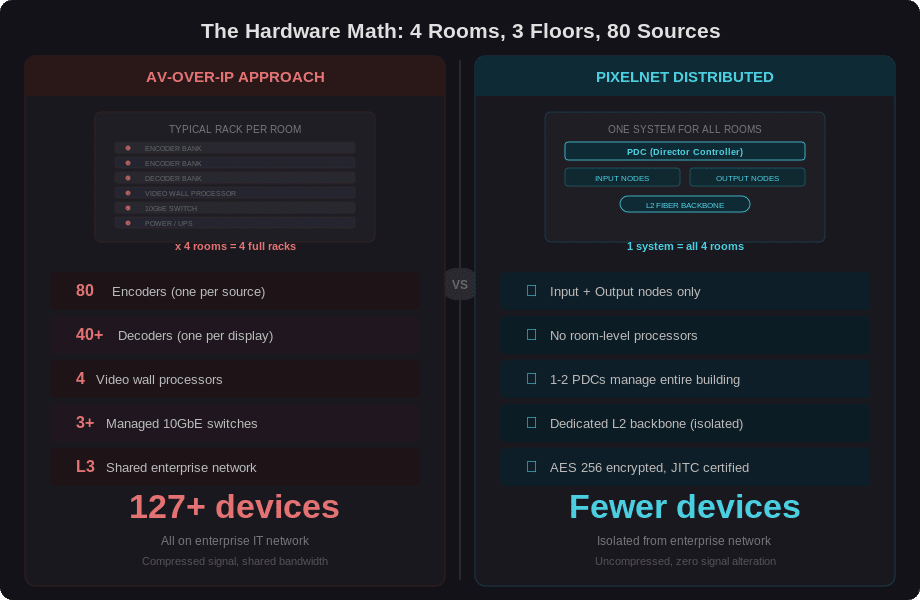
For a building with 80 sources and four video wall rooms, that means roughly 80 encoders (one per source), 40 or more decoders (one per display), four independent video wall processors (one per room), and enterprise-grade 10 Gigabit Ethernet switches on every floor to handle the bandwidth. Each room operates as its own island. Sharing a source between rooms means encoding it once but decoding it multiple times, adding decoder hardware at every destination.
The rack count adds up fast. Each room needs its own processor chassis, its own set of decoders, its own local switching. Multiply that across four rooms and three floors, and the hardware footprint, power consumption, and cooling requirements become a project unto themselves.
There is also the bandwidth reality. Most legacy AV-over-IP systems operate on 1 Gigabit Ethernet networks. On paper, 1GbE looks like a minimal infrastructure footprint. In practice, 1GbE does not have the bandwidth to carry uncompressed 4K video. This is why compression is not optional in these systems: it is a hard requirement imposed by the network itself. Encoders must compress every source stream to fit within 1GbE throughput, and decoders must decompress on the other end. Even when switches are dedicated to the AV network or purpose-configured for the installation, bandwidth contention across dozens of compressed streams creates bottlenecks. Frames drop. Artifacts appear. Pixels arrive corrupted.
In a conference room, a corrupted pixel is a visual nuisance. In a military operations center, a utility grid control room, or an emergency dispatch floor, a faulty pixel can mean a misread coordinate, a wrong grid sector, or an incorrect unit identifier on a video wall that operators rely on for real-time decision making. Compression artifacts in these environments are not cosmetic problems. They are operational risks.
Then there is the network question. AV-over-IP runs on Layer 3, the same network infrastructure that carries enterprise data, email, and internet traffic. Every encoder and decoder is a networked device with an IP address, firmware, and a potential attack surface. For facilities handling sensitive or classified information, putting video distribution on the same network as operational data is not a minor architectural concern. It is a security decision.
A Different Architecture: Distributed Uncompressed Processing
PixelNet takes a fundamentally different approach. Instead of compressing video into IP streams and relying on the enterprise network, PixelNet distributes uncompressed pixels across a dedicated 10 Gigabit Ethernet Layer 2 backbone that is physically isolated from IT infrastructure. The 10GbE backbone provides the raw bandwidth needed to transport every pixel without compression, eliminating the bottleneck that forces legacy 1GbE systems to compress in the first place.
This is not AV-over-IP. It is a distinct architecture category: distributed like AV-over-IP in reach, but uncompressed like dedicated hardware processing in signal quality. Every pixel arrives at the display exactly as it left the source, with a pixel-perfect guarantee that no compression artifact, no dropped frame, and no bandwidth contention can compromise. No other manufacturer offers true distributed video wall processing across entire buildings with zero compression.
The architecture is built on a modular node system. Each node type serves a specific function, and nodes are added or removed without reconfiguring the rest of the system.
Input Nodes: Source Capture
Input nodes connect directly to source devices and capture video at resolutions up to 4K. Each input node handles one source, whether that source is a workstation, a server, a camera feed, or a KVM-enabled machine. For IP-based sources such as surveillance cameras, RTSP streams, or media servers, the StreamCenter node decodes virtually any IP stream on a corporate or dedicated AV network.
Output Nodes: Display Driver
Output nodes drive displays. A single output node can power one window on one screen, multiple windows on a single screen, or an entire section of a display wall. Speakers connect directly to the output node for local audio. There is no separate video wall processor per room because the output node handles windowing, scaling, and layout natively.
For operators who need a compact workstation display, the Standalone Output Node provides a small form factor that fits on a desk while still driving multiple sources and windows on a connected display.
PDC: The Director Controller
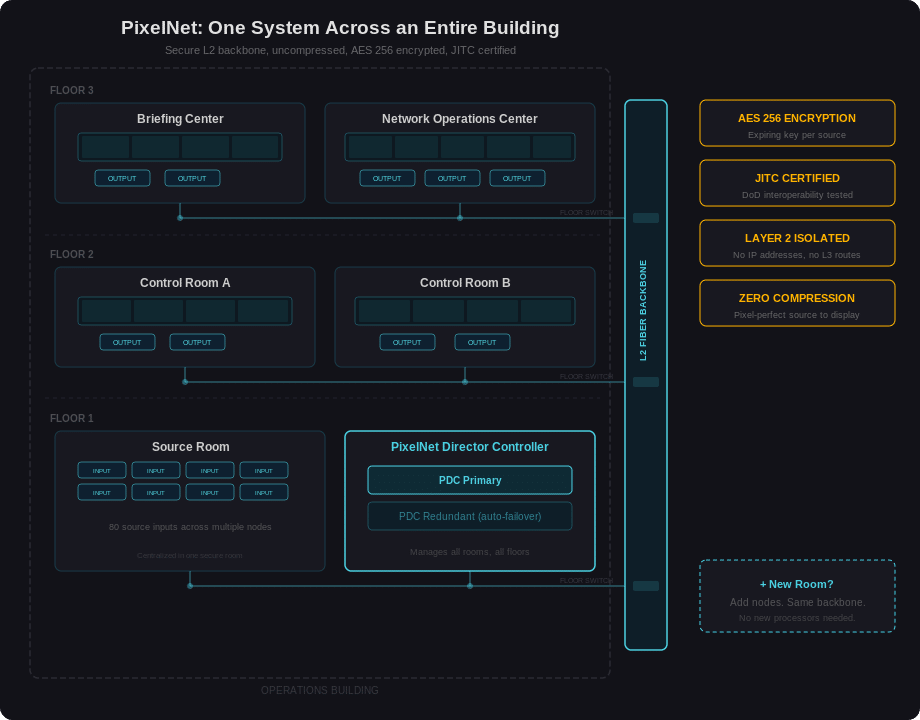
The PixelNet Director Controller (PDC) manages the entire system. It controls source routing, monitors node status in real time, and handles bandwidth allocation across the L2 backbone. A single PDC manages all nodes across all rooms, all floors, and all buildings in the deployment.
For mission-critical operations that require 24/7/365 uptime, a second PDC provides automatic failover. The system is self-configuring and self-monitoring: if the primary PDC goes offline, the secondary takes over without operator intervention. Nodes are hot-swappable, and power supplies are redundant.
KVM Control: K/M Link
In environments where operators need to interact with remote sources from their workstation, the K/M Link node enables keyboard and mouse control over any supported PixelNet source. Two mini-USB cables connect the K/M Link to enable KVM functionality, and it can be added to any existing installation without redesigning the system. For VNC-encoded sources, KVM works natively through the PixelNet backbone.
Canvas: Web-Based Visualization Management
PixelNet integrates with Jupiter’s Canvas web client for visualization management. Operators use Canvas to route sources to displays, manage wall layouts, and control mimic views from any browser. On PixelNet, Canvas runs through a dedicated standalone node that displays selective sources, providing wall management without requiring software installed on individual operator desktops.
The Hardware Math
Consider a concrete comparison for a four-room deployment across three floors.
An AV-over-IP approach requires approximately 80 encoders, 40 decoders, 4 video wall processors, floor-level 10GbE managed switches, and rack space in every room. That is well over 127 individual networked devices before cabling.
PixelNet requires input nodes for sources, output nodes for displays, one or two PDCs, and PixelNet-qualified switches for the L2 backbone. The total device count drops significantly, with fewer failure points, less power draw, and less rack space per room.
The operational difference compounds over time. Fewer devices means fewer firmware updates, fewer potential failure points, and a smaller maintenance window. When every device is a networked endpoint (as with AV-over-IP), each one represents a patching obligation and a security audit item. PixelNet nodes on a closed L2 network carry none of that Layer 3 administrative overhead.
Security by Architecture
PixelNet’s security model is not an add-on feature. It is a consequence of the architecture itself.
The Layer 2 network is physically separate from enterprise IT infrastructure. There are no IP addresses to target, no routes to exploit, no shared bandwidth with operational data. The video backbone is invisible to the enterprise network because it does not exist on it.
Every pixel transported across the PixelNet backbone is encrypted with AES 256 using an expiring key management architecture. Each source maintains its own encryption key that rotates automatically, ensuring that even physical interception of the fiber would yield nothing usable.
The video signal is never compressed. This matters for security-sensitive environments because compression algorithms alter pixel data. In intelligence analysis, medical imaging, or surveillance monitoring, the source signal must arrive at the display exactly as it left the source. Zero compression means zero alteration.
PixelNet carries JITC (Joint Interoperability Test Command) certification, tested for technologies pertaining to multiple branches of the armed services and government. This is not a self-declared compliance statement. It is an independent certification from the organization responsible for validating interoperability and security for Department of Defense systems.
Real-World Deployment Scenarios
Defense Operations Center
A military joint operations center spans two floors of a secure facility. The main operations floor has three video walls: a primary situational awareness wall (4×3 array), a secondary intelligence display (3×2), and a briefing wall (2×2). The upper floor houses a command suite with its own 2×2 wall and a SCIF (Sensitive Compartmented Information Facility) with a 3×1 display strip.
Sixty sources feed the system, including classified workstations, satellite feeds, surveillance cameras, and mission planning applications. Every source requires uncompressed signal integrity and end-to-end encryption. The network carrying video data cannot touch the enterprise or classified IT networks.
With AV-over-IP, this deployment would require separate encoding, decoding, and processing hardware in every room, all running on the same network infrastructure that carries classified data. With PixelNet, input nodes in the server room capture all 60 sources, output nodes in each room drive the walls, and the entire system runs on an isolated L2 backbone that IT security can audit as a physically separate network. JITC certification satisfies the compliance requirement without additional validation.
Utility Grid Control Center
A regional power utility operates a primary control center with a large SCADA overview wall (6×3 array showing grid topology), an alarm management wall (3×2), and a weather monitoring display (2×2). A secondary facility 40 miles away mirrors the primary wall for redundancy, with its own 4×2 display and operator stations.
The sources include SCADA terminals, GIS mapping systems, weather radar feeds, and camera streams from substations. Operators need KVM control to interact with SCADA workstations directly from the control floor.
PixelNet’s fiber backbone connects both facilities as a single system. The PDC in the primary building manages all walls across both sites. K/M Link nodes at operator positions provide KVM access to SCADA workstations without running separate KVM infrastructure. When the utility adds a third monitoring facility, it extends the backbone and adds nodes. The PDC already manages them.
Multi-Floor Transportation Hub
A metropolitan transit authority manages train, bus, and emergency operations from a single building. The ground floor houses the transit operations center with a 5×3 video wall showing real-time vehicle tracking, passenger information, and CCTV feeds. The second floor has a separate emergency management center with a 4×2 wall for incident response. The third floor has a public information room used for press briefings and stakeholder presentations, with a smaller 3×1 display.
Over 100 sources feed the system: GPS tracking for 500+ vehicles displays through 20 mapping workstations, 60 CCTV camera streams, weather and traffic data feeds, and communications consoles.
Each room needs access to different combinations of the same source pool. During a major incident, the emergency center needs the same camera feeds and tracking data already displayed in the operations center, routed instantly without reconfiguring hardware. PixelNet’s any-source-to-any-display routing through the PDC handles this in real time. Adding the press briefing room required only output nodes and a fiber connection to the existing backbone.
Beyond One Building
The same L2 backbone that connects floors within a building can extend across a campus using fiber. PixelNet installations span multiple buildings, multiple sites, and in some deployments, multiple cities. The PDC manages all of it as a single unified system.
Adding a new building to an existing deployment means extending the fiber backbone and adding nodes. There is no need to deploy a new processor, configure a new network segment, or integrate with a different management platform. The new rooms simply appear in the existing Canvas interface alongside every other display and source in the system.
For organizations that start with one control room and grow over years, this matters. PixelNet scales by adding nodes, not by replacing processors or re-architecting the network.
Distributed Processing vs. AV-over-IP: Key Differences
| Feature | AV-over-IP | PixelNet Distributed |
|---|---|---|
| Bandwidth | 1GbE (compression required) | 10GbE (uncompressed native) |
| Signal | Compressed, risk of pixel corruption | Uncompressed, pixel-perfect guarantee |
| Network | Layer 3, shared with enterprise IT | Layer 2, physically isolated |
| Encryption | Varies by vendor | AES 256, expiring keys per source |
| Room hardware | Encoder + decoder + processor per room | Output nodes only, no room processor |
| Scalability | Add encoders, decoders, processors, switches | Add nodes to existing backbone |
| Certification | Varies | JITC certified |
| KVM | Separate infrastructure required | Native via K/M Link or VNC |
| Management | Per-room or per-system software | Single PDC manages all rooms and sites |
| Redundancy | Varies by vendor | Dual PDC auto-failover, hot-swap nodes |
| Multi-site | Separate systems per site | Single system across sites via fiber |
Who This Is For
This architecture serves a specific set of requirements. Organizations that need multiple video walls across a facility, that handle sensitive or classified information, that want to minimize hardware footprint per room, and that require uncompressed signal integrity from source to display.
Defense and intelligence operations. Utility grid control centers with regional oversight rooms. Transportation authorities managing multiple dispatch floors. Financial trading operations where a single campus houses multiple visualization environments. Emergency operations centers that coordinate across agencies and facilities.
If the requirement is a single video wall in a single room, a centralized processor like Catalyst handles it with less complexity. PixelNet exists for the deployment that outgrows a single room.
Frequently Asked Questions
Is PixelNet an AV-over-IP system?
No. PixelNet is a distributed video wall processing system that operates on a dedicated Layer 2 network, physically isolated from enterprise IT infrastructure. AV-over-IP systems compress video and run on Layer 3 (IP) networks. PixelNet transports uncompressed pixels with zero signal alteration.
Why does AV-over-IP require compression?
Most legacy AV-over-IP systems run on 1 Gigabit Ethernet networks, which do not have enough bandwidth to carry uncompressed 4K video. Compression is a hard requirement imposed by the 1GbE throughput limit, not a design choice. This compression can introduce artifacts and pixel corruption, which is unacceptable in mission-critical environments where operators rely on pixel-accurate data. PixelNet operates on a dedicated 10GbE Layer 2 backbone, providing the bandwidth for uncompressed transport with a pixel-perfect guarantee.
How many sources and displays can PixelNet support?
PixelNet scales to unlimited sources and displays across multiple rooms, buildings, and geographic sites. The L2 fiber backbone supports large distributed systems, and the PDC manages all nodes as a single unified system.
What resolution does PixelNet support?
Input and output nodes support resolutions up to 4K. Each source is captured at its native resolution and delivered to displays without compression or downscaling.
Can operators control remote sources from their workstation?
Yes. The K/M Link node enables keyboard and mouse control over PixelNet sources. For VNC-encoded sources, KVM works natively through the backbone. This eliminates the need for separate KVM-over-IP infrastructure.
What happens if the primary controller fails?
A second PDC provides automatic failover. The system is self-monitoring: if the primary PDC goes offline, the secondary takes over without operator intervention. Individual nodes are hot-swappable, and power supplies are redundant.
Does PixelNet work across multiple buildings or sites?
Yes. The L2 fiber backbone extends across campuses, cities, and regions. All sites are managed by a single PDC as one unified system. Adding a new building means extending the backbone and adding nodes.
What security certifications does PixelNet hold?
PixelNet is JITC (Joint Interoperability Test Command) certified, independently tested for interoperability and security for Department of Defense systems. The system uses AES 256 encryption with expiring key management for every source.
How does PixelNet integrate with existing video wall management?
PixelNet uses Jupiter’s Canvas web client for visualization management, source routing, mimic control, and wall layout configuration, accessible from any browser.
Start With the Problem
The right video wall architecture starts with the building, not the brand. How many rooms. How many floors. How many sources need to reach how many displays. Whether the network can or should carry video traffic. Whether compression is acceptable for the content being displayed.
When the answers point to multiple rooms, isolated networking, uncompressed signal integrity, and minimal hardware per room, the architecture points to distributed processing.
Explore the PixelNet product page or use the Video Wall Controller Selector Tool to match your deployment requirements to the right architecture.


